Stop spending hours on email audits. Upload your report and get benchmarks, trends, and a 90-day action plan in minutes.

We've all gotten that knock on the door.
Average open rates are down. Unsubscribe rates are climbing. The CMO wants answers by Friday. And now you're staring at a spreadsheet with 200+ email sends, trying to figure out where things went sideways — and when it started.
You'll spend the next three hours pulling data from your MAP, dumping it into a worksheet, manually cross-referencing against industry benchmarks you Googled from Klaviyo's latest report, and building a slide deck that says what you already suspected: some emails are dragging the averages down, but you're not sure which ones matter most.
This is email performance analysis in 2026 for most MOPs teams. It's manual. It's slow. And by the time you deliver the audit, the window to fix anything has already shrunk.
We built something to fix that.
The Email Performance Analyzer is a free Claude Skill built by allGood — powered by 15+ years of email marketing knowledge and the best industry benchmark data available.
Here's what it does: you upload your email performance report. Mary (allGood's AI) analyzes it. You get back a full audit — benchmarks, trends, red flags, and a prioritized action plan — in minutes instead of hours.
No pivot tables. No benchmark Googling. No "let me get back to you next week."
It's free, it runs inside Claude, and it was built specifically for B2B marketing operations teams who don't have time to do this manually every month.
This isn't a dashboard with charts you'll never look at. It's a structured analysis with three things that actually matter:
Every metric in your report gets compared against current industry benchmarks. Open rates, click-through rates, unsubscribes, bounces — all measured against what "good" actually looks like for your industry, not some generic average across all email ever sent.
You'll immediately see where you're outperforming and where you're falling behind. No more guessing whether a 22% open rate is good or terrible (depends on your industry — and now you'll know).
The analysis looks across your email data to surface patterns. Which sends are pulling averages up? Which ones are dragging everything down? Is there a trend over time — are things getting worse, getting better, or just noisy?
You get a clear breakdown of strengths to double down on and red flags that need attention now. Not a wall of data. A story about what's happening and why it matters.
This is the part most audits skip. Knowing what's wrong is only half the job — you need to know what to do about it and in what order.
The analyzer delivers a structured action plan broken into three timeframes:
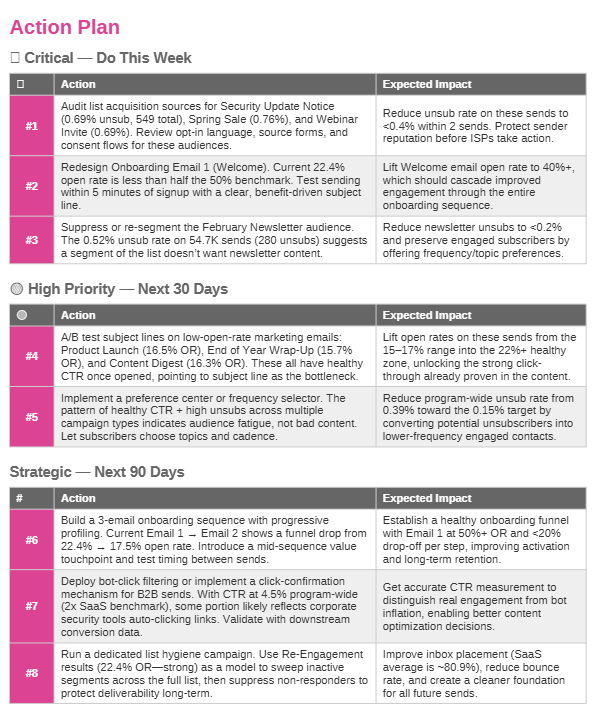
You walk away with a document you can hand to your team (or your CMO) that same day.
New to Claude skills? Check out our quick setup guide to get installed and ready in under two minutes.
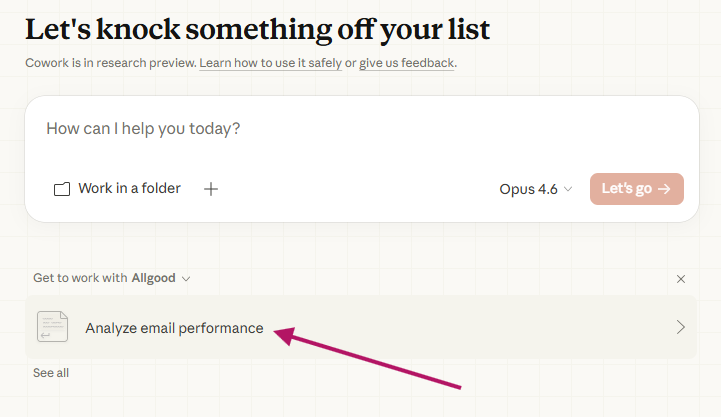
You can customize the output format and prompt Claude directly to adjust the report. Want just the executive summary for a leadership update? Ask for it. Want the full deep-dive with every metric broken out? You'll get that too.
Here's the honest answer: email audits are one of those tasks that everyone knows they should do more often but nobody has time for. The data is there. The benchmarks are published. The analysis isn't rocket science.
But pulling it all together — exporting data, formatting it, comparing it, identifying patterns, building recommendations — that's a half-day exercise at minimum. So it gets done quarterly at best, or only when something breaks.
We think MOPs teams should be able to run this analysis whenever they want, in minutes, without it being a project. That's why we made it free. The better your email program performs, the better everything downstream works — and that's good for everyone.
Your email data is already sitting in your MAP. The benchmarks exist. The analysis framework exists. The only thing missing was a way to connect them without burning half your week.
Download your email metrics and start analyzing today.
Upload the export from your marketing automation platform. CSV or Excel formats work. The analyzer handles the rest.
Minutes. Depending on the size of your dataset, typically 2-5 minutes for a complete analysis with benchmarks, trends, and action plan.
Industry-standard benchmarks sourced from leading email marketing platforms and research — the same data points published by Klaviyo, Mailchimp, and Litmus, organized so you don't have to cross-reference them yourself.
Yes. The Email Performance Analyzer is a free Claude Skill available through the allGood marketplace. No trial period, no feature gates.
No. You just need Claude Desktop and the allGood marketplace plugin installed. The skill is available to anyone.
Any platform that lets you export email performance data. HubSpot, Marketo, Pardot, Eloqua, Salesforce Marketing Cloud, Mailchimp — if you can export the data, the analyzer can read it.

Book a 1:1 demo and meet your new favorite (AI) employee.